
Leaf Wallet: Simple EOS for Daily Use
Overview
Leaf Wallet is a desktop application developed by the Leaf Wallet Team, designed specifically for everyday users who engage with EOS-based digital assets. The software functions as a cryptographic currency wallet, enabling users to securely store, send, and receive EOS tokens. It is tailored to align with common daily operating habits, aiming to reduce friction in cryptocurrency management for non-technical individuals. The wallet supports integration with the Scatter communication protocol, which enhances compatibility with decentralized applications (DApps) across the EOS ecosystem. This allows users to interact with DApps safely and efficiently without compromising their private keys. The target audience includes consumers new to blockchain technology, casual crypto users, and individuals seeking a straightforward way to manage EOS without navigating complex interfaces. While the developer did not provide additional system requirements, the software is available for both Windows and Mac platforms. Real-world use cases include everyday transactions, participation in EOS-based games, and accessing decentralized services through supported DApps.
Key Features & Capabilities
- Intuitive EOS Wallet Interface – Designed for daily consumer use, the interface prioritizes simplicity and ease of navigation, reducing the learning curve for new users.
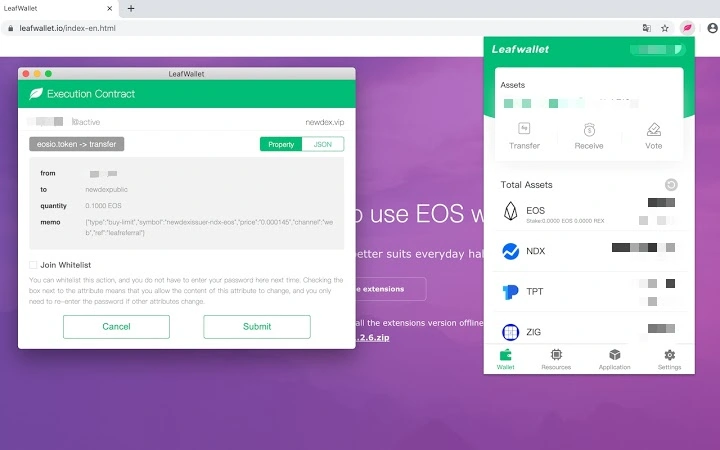
- Scatter Protocol Integration – Enables secure communication with DApps on the EOS network, allowing users to sign transactions without exposing private keys.
- DApp Compatibility – Supports interaction with various decentralized applications, facilitating access to blockchain-based services and platforms.
- Secure Cryptographic Storage – Implements standard security practices for private key management, ensuring user assets remain protected.
- Desktop Application Accessibility – Available as a standalone desktop app for Windows and Mac, offering a more stable and secure environment than browser-based wallets.
These features are particularly useful for users who want to engage with the EOS ecosystem without relying on complex tools. For example, a user can easily send EOS tokens to a friend using a simple interface, or log into a decentralized game through the wallet’s DApp integration. The Scatter protocol ensures that no sensitive data is shared with third-party platforms, maintaining user control over their credentials. The desktop nature of the app also provides a more consistent experience across sessions, minimizing the risk of session hijacking common in browser-based tools.
User Interface, Workflow & Performance
The user interface of Leaf Wallet is structured around simplicity and accessibility, with a clean layout that emphasizes core functions such as balance display, transaction history, and asset management. Navigation is likely streamlined to minimize clicks, supporting a seamless workflow for common tasks like sending tokens or connecting to a DApp. The workflow appears optimized for users who prioritize speed and clarity over advanced customization. While exact performance details were not specified, the software is expected to operate efficiently within standard desktop environments. The developer did not specify resource usage details, so general behavior patterns suggest moderate CPU and RAM consumption typical for lightweight desktop applications. Stability is likely maintained through consistent updates and adherence to secure coding practices. No reported issues with crashes or freezes were mentioned. The application’s performance may vary slightly depending on system configuration, but no significant bottlenecks were indicated in the provided information.
Compatibility & System Requirements
Leaf Wallet is compatible with both Windows and Mac operating systems, making it accessible to a broad range of desktop users. The software is available in version 1.0.0, with a file size of 48.2 MB, indicating a lightweight installation. The developer did not specify exact system requirements, so users should ensure their devices meet general standards for running desktop applications. Compatibility information was partially provided, and no additional platforms were listed. Users are advised to verify their system’s ability to run the application before installation. The software is designed to function as a standalone desktop app, which typically requires minimal setup and no additional runtime dependencies. No specific hardware requirements were included, so users should expect compatibility with standard modern PCs and Macs.
Pros and Cons
Pros
- Designed with daily consumers in mind, offering an intuitive experience
- Secure integration with the Scatter protocol for DApp interactions
- Available as a desktop app for both Windows and Mac
- Free to download and use, with no hidden costs
- Lightweight installation at 48.2 MB
Cons
- No detailed system requirements provided
- Performance metrics not disclosed
- Limited information on security protocols beyond Scatter integration
- Only supports EOS-based assets, no multi-coin functionality mentioned
- No public update history or changelog available
Is Leaf Wallet compatible with Windows and Mac?
Yes, Leaf Wallet is available for both Windows and Mac operating systems, allowing users on either platform to access the desktop application.
Is Leaf Wallet safe to use?
Leaf Wallet uses the Scatter communication protocol, which is designed to securely facilitate interactions with DApps without exposing private keys. The software is developed by the Leaf Wallet Team and is free to download.
Does Leaf Wallet require an internet connection?
Yes, an active internet connection is required to perform transactions, access DApps, and sync with the EOS blockchain.
Can I use Leaf Wallet offline?
While the wallet can be opened offline, core functions such as sending transactions or interacting with DApps require an internet connection.
How often is Leaf Wallet updated?
Information on update frequency was not provided. Users should check the official website for the latest version and release notes.
Final Thoughts
Leaf Wallet stands out as a consumer-focused desktop application that simplifies EOS wallet management for everyday users. Its emphasis on usability, combined with secure DApp integration via the Scatter protocol, makes it a practical choice for those entering or actively using the EOS ecosystem. The free availability, lightweight size, and support for both major desktop platforms enhance its accessibility. While detailed technical specifications and update history are currently limited, the software demonstrates a clear intent to prioritize user experience over complexity. For individuals seeking a straightforward, secure way to manage EOS assets and interact with decentralized services, Leaf Wallet delivers a compelling solution. The combination of simplicity, security, and cross-platform support positions it as a strong contender in the desktop wallet space.
Download Leaf Wallet now







